
PlayerMarketGUI
A free to use player market plugin


A free to use player market plugin

✔️ 1.16-26.x (Support for multiple Minecraft versions)
✔️ Player GUI shops (Let payers create their own shops and sell items)
✔️ Auction House (Let players auction their items)
✔️ Chest Shops (Buy and sell items from chests)
✔️ Sign shops (The more classic approach of chest shops)
✔️ Custom item support (List or sell custom items with custom data, no integrations needed)
✔️ Hologram support (Support for DecentHolograms, FancyHolograms and CMI)
✔️ Discord Hook (Send different event messages to a Discord webhook URL or via DiscordSRV integration)
✔️ 100% localized (Change or customize over 500 messages inside multiple pre-translated language files)
✔️ Advanced commands (Create your own command aliases or even register as root commands via the config.yml)
✔️ Search (Easily search player auction listings or player shops)
✔️ Modular (Disable any feature that doesn't fit on your server)


• /playermarket or /pm (Open the main menu)
• /pm ah, /auction or /ah (Opens the Auction House)
• /pm mylistings (Shows the payer's listings created on the Auction House or in Player Shops)
• /pm listitem, /listitem or /list (Directly lists a new item from your hand on the Auction House)
• /pm playershops, /playershops or /pshops (Shows all active player shops)
• /pm inbox or /inbox (Opens the inbox listing claims like expired listings or even shop sales)
• /pm search (Opens the search menu)
• /pm migrate (Import your data from the free version of the plugin)
• /pm reload (Reloads the plugin)
• /pm help (Shows a list of all commands you may use)
Note that every command and aliases listed here are default and most can be changed/disabled inside the config.yml

• playermarketgui.chest-shops.break (Gives access to destroy chest shops of other players)
• playermarketgui.limits.auction-listings.<limit> (Overrides the default maximum auction house listings a player can have)
• playermarketgui.limits.shop-listings.<limit> (Overrides the default maximum shop listings a player can have)
• playermarketgui.limits.auction-duration.<limit> (Overrides the default duration a item is listed for on the auction house and/or player shop)
• playermarketgui.limits.chest-shops.<limit> (Overrides the default amount of chest shops a single player can create)
All default limits can be configured or removed in the config
But by default PlayerMarketGUI uses default limits to allow server owners to enhance the player's gameplay as they level up
• playermarketgui.commands.main (Allows access to the main command(s))
• playermarketgui.commands.auctionhouse (Allows access to the auction house command(s))
• playermarketgui.commands.listitem (Allows access to the list item command(s))
• playermarketgui.commands.playershops (Allows access to the player shop command(s))
• playermarketgui.commands.inbox (Gives access to the inbox command(s))
• playermarketgui.commands.mylistings (Allows access to the mylistings subcommand)
• playermarketgui.commands.search (Allows access to the search subcommand)
• playermarketgui.commands.help (Gives permission to the help subcommand)
• playermarketgui.commands.migrate (Gives permission to the migrate subcommand)

The only plugin required to use PlayerMarketGUI is a economy plugin, currently we support:
• Vault (Requires a economy plugin like Essentials or CMI)

If you have a question or need support, please join our discord support server.
Have a suggestion for the plugin?
Your suggestions make the plugin better, join our discord server and we will look into it!

PlayerMarketGUI Premium is here with more features such as bidding auctions, offers and a delivery board.
Click here to see more details.

Not conviced yet?
You can test the plugin on our 1.8-26.x skyblock test server.
IP: testserver.gpplugins.com
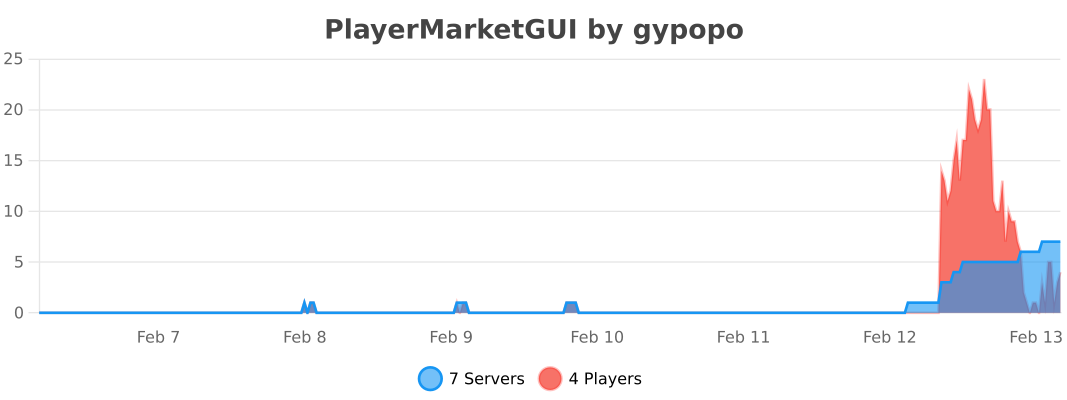
This plugin uses bStats to collect anonymous statistics such as how many servers/players are using the plugin.
More info can be found at bStats.
Installation Instructions
- Download the plugin JAR file
- Place the JAR file in your server's plugins folder
- Restart your server or use a plugin manager to load the plugin
- Configure the plugin using the config.yml file in the plugin's folder
Requirements
- Economy provider
Update History
PlayerMarketGUI v1.7.0
Added:
- Per chest/sign shop option to show recent transactions of players
- Support for display items above a chest shop (Default is enabled)
- Supports protocol lib for client side items
- Config option to automatically remove empty shop categories after a specific delay (Defaults to 14 days)
- Protection support for GriefPrevention & GriefDefender
- Wiki link: https://wiki.gpplugins.com/playermarketgui/playermarketgui/protection-plugins
- Cooldown for clicking in GUI's
Premium:
- Added blacklist for delivery item picker, to prevent players creating requests for creative only items for example
- By default it lists creative only items like bedrock, barrier, ...
- Add support for registering the /delivery command as root and adding aliases in config.yml
- Added config option to change the default delivery expiration date, can also be overridden per player via permissions
Fixed:
- Error when enabling plugin on 1.21.11 and older Spigot server versions (since latest version)
- The edit price menu wouldn't respect the disable-back-button config option when going to it via /mylistings GUI
- Cleaned up code
PlayerMarketGUI v1.6.3
- Added direct integration with AutoSellChests and QuickShop hikari
- Added missing language messages for Edit Price GUI to language files
- Fixed NPE when disabling plugin when not being enabled correctly
- Fixed disable-back-button still closing GUI if Auction House was directly opened via commands
- Updated lang keys of Shop List Item GUI language messages (Will be updated automatically thru a config update)
PlayerMarketGUI v1.6.2
Changed:
- The plugin now uses GPLib as a library between some of my plugins that share similar code to prevent duplicated code
Fixed:
- menus.yml not creating itself on first install of the plugin
PlayerMarketGUI v1.6.1
- Added missing default playermarketgui.commands.delivery permission
- The selected item in the create deliver GUI is now also a dynamic amount based on the selected amount
- Fixed dupe exploit while listing new item
PlayerMarketGUI v1.6.0
- The WorldGuard flags of the plugin now also correctly check if the player is the region owner/member or has override permissions
- Support for Fallback protection which can be used if the protection plugin(s) used on your server is not supported
- Added per chest shop option to enable/disable holograms above a chest shop
- If disabled in config, it overrides the per chest setting and can no longer be toggled on/off
- Added disable-back-button config option to prevent going to the main menu in inbox, sell item, auction house, playershops, offers, myoffers, mylistings and search GUI when directly opened by its command (Default enabled)
Premium:
- Added max delivery requests option for players (Can be overriden by permissions using playermarketgui.limits.delivery-requests.<number>)
- Added delivery request item picker (If the player does not have the item they want to request)
- Reworked Complete Delivery GUI to also include custom amount button
PlayerMarketGUI v1.5.1
- Support for WorldEdit/FAWE now removing chest shops instantly instead of server restart if overriding the blocks
- Wiki: https://wiki.gpplugins.com/playermarketgui/playermarketgui/protection-plugins#worldedit
- When the owner of a chest shop is online, they now receive the money from sales directly instead of via /inbox (Which is only when the owner is offline)
- The 'chest-shop-creation' flag for WorldGuard will no longer be overriden on server startup (Which was done before to set its default behavior)
- Fixed automatically upating lang file for new keys on server start
- Fixed debug message loading menus.yml config on startup
PlayerMarketGUI v1.5.0
- Better support for WorldGuard, now adding 2 custom region flags to allow shop purchases/creation
- Added Lands support, adding 2 Role flags which can be toggled independantly per player role to allow shop purchases/creation
- Support for ChestProtect, now allowing chest shop creation for trusted players if the chest is locked
- Support for Towny, preventing chest/sign shop creation if player doesn't have permissions for it
- Wiki link for info about currently supported protection plugins: https://wiki.gpplugins.com/playermarketgui/playermarketgui/protection-plugins
- Fixed incompatiblity with Essentials when clicking the join messages to open inbox/offers screen
- Fixed DiscordSRV hook not working
PlayerMarketGUI v1.4.0
Added:
- Support for MC 26.2
- Support for Folia servers
- Support for forwarding discord messages based on 4 conditions (new auction listing, auction house transactions, new GUI shop listing and GUI shop transactions)
- Messages can either be forwarded directly to a discord webhook url or via DiscordSRV integration
- https://wiki.gpplugins.com/playermarketgui/playermarketgui/configuration#discord-messages
- Added option to directly search shops or ah via command using /shops search <query> and /ah search <query>
- Option to change the language file being used
- Currently only supports English, Dutch, Spanish and French
- Help translate and improve existing languages on our Crowdin here: https://crowdin.com/project/playermarketgui
- Config option to send console logs of Auction House/GUI shop transactions (Enabled by default)
- Reworked Create Bid GUI layout (Also fixes custom bid price not working)
Premium:
- Added GUI for buyers to be able to view their active outgoing offers and cancel them if already send to seller
- Can be accessed by /pm myoffers command
- Support for adding a economy cost to shop links
Changed:
- Renamed COINS_ENGINE integration internally to ExcellentEconomy (Config.yml will auto update if using CoinsEngine)
- The selected item inside a change quantity GUI now changes its stack size dynamically depending on how many items selected to help visualize
Fixed:
- Cancelling a listing with more items in stock as its stack size, would only refund the max stack size of the item
- Cicking the switch to My Shop Listings button would close the GUI
- Closing the restock GUI with ESC or any other method other then clicking the confirm button, destroys the items inside
- Clicking the 'Restock shop' option in a Chest Shop manage GUI would not open the chest inventory
- Bidding on Auction listings is now also available for use in the free version (This was only working on the premium version but it should have been a free feature in the first place)
PlayerMarketGUI v1.3.0
- Chest shops can now also be created by signs
- Sign structure: https://wiki.gpplugins.com/playermarketgui/playermarketgui/general-how-tos#creating-a-sign-shop
- Added GUI for showing all incoming offers for seller which can be opened via /pm offers
- Players now receive notification on join if any offers for auction/shop listings are pending
- Added config option to disable this(Enabled by default)
- Shops and Auction listings from other players can now be managed by admins which can remove the listing if needed
- Fixed players unable to delete a shop if there was a item inside it before
PlayerMarketGUI v1.2.3
- Reworked Buy Amount, Edit Listing Price, Create Offer and List Offer GUIs to include custom price input option and have a similar style as the list new item GUIs
- GUI shop categories can now have a name up to 128 characters including color characters, instead of only 32 which is not alot when you want RGB colored names
- Fixed cancelling a GUI shop listing would only refund 64 items even if there are more items in stock
- Fixed GUI shops can now also be sorted
PlayerMarketGUI v1.2.2
- Fixed database error on first install & creating offers
PlayerMarketGUI v1.2.1
Fixed:
- Fixed lore chatcolors not working when browsing shops
- Sort options in seller GUI shop not working
- Fixed shop listings search GUI not working
Changed:
- Searching a item now gives the search option again
- Support for protection plugins like WorldGuard now correctly preventing chest shop creation in protected regions
- Also prevents sellchests from AutoSellChests being turned into chest shops and other custom chest plugins which use the bukkit API correctly
PlayerMarketGUI v1.2.0
Added:
- Custom price input option in list item on auction, list item in shop, create bidding auction, create request and create chest shop GUI's
- Support for opening commands for a specific player via console like /ah [player], /pshops [player], /pm search [player], /inbox [player], allowing commands to be executed from NPC's
- Added confirm lore on action items such as list new item, create request, create chest, ... shop buttons
Changed:
- Using the 'add item' option to list a new shop item now sets the price per item instead of the full stack
- Removed player shops allowChangingNameLore feature
- Added missing language file entries for sort options and main menu
- Reworked list item GUI's for better clearity
PlayerMarketGUI v1.1.1
- Support for paper's 26.1 new versioning schema
- Fixed TNT would destroy a chest shop but not the hologram
PlayerMarketGUI v1.1.0
Added:
- Support for MC 26.1
- Players will now receive a notification on join if they have unclaimed items in their inbox
- Can be disabled in config, default is enabled
- Added option to disable chest shop creation on specific worlds
- Support for CMI holograms
- Chest shop holograms will now only be loaded and updated if the chunk is loaded to prevent performance issues with forcefully loading chunks
- Holograms are now also updated on a scheduled task if connected to a hopper and if loaded, to actively update the stock amount
- Can be changed in config, default is 30 sec
Changed:
- Dropped support for 1.16.3 and below, following changes of EconomyShopGUI
- Placing a new chest against a linked chest shop woudn't update the shop unless restarted
PlayerMarketGUI v1.0.3
- Fixed sell item GUI item dupe glitch when collecting all items to cursor
- Fixed hologram being stuck when chest shop explodes
- Chest shop holograms will now be updated correctly instead of replaced when using DecentHolograms
- Creating a new chest shop via GUI now also requires shift clicking a chest to select it(unlike before which used regular left click)
PlayerMarketGUI v1.0.2
- Fixed database error when editing a existing shop item's price via the GUI
- Creating a chest shop via the GUI now requires also shift clicking a chest
PlayerMarketGUI v1.0.1
- Fixed NPE while refunding latest bidder if not online when cancelling/updating bidding auction
- Upddated CoinsEngine(ExcellentEconomy) hook, which dropped support for the old version(so you need to use the latest version)
- The transaction confirm menu would show the total price of a linked shop item as negative
PlayerMarketGUI v1.0.0 | Final release version
This update costed me alot of work and will also mark the first release version of PlayerMarketGUI, I hope you enjoy this update
Sadly this makes the plugin automatically override your data as it required me to recode alot, which is the first and last time your data is lost
If any issues are found or if you have suggestions to improve the plugin even more, please reach out to our discord support at https://discord.gpplugins.com/
I also took the time to document the whole plugin, or atleast what is worth it as multiple people already asked for this: https://wiki.gpplugins.com/playermarketgui
Added:
- Added hologram support from DecentHolograms and FancyHolograms
- Auction house and player shop listings can now be sorted by Price, Seller Name, Item Name and Creation Date where each sort mode can be changed from ascending to descending seperatly
- Sort options will also be remembered by player, making sure the last chosen option isn't lost when they next use the Auction House for example
- Player GUI shops can now have color codes in title/description
- Config option 'partial-purchases' to toggle auction house quantity changes for buy now listings
- Default is now disabled which aligns better with real life auctions
- Changed the way player shop GUI listings can be restocked
- Listings can now be restocked up to a configurable limit of items
- Restock can be disabled entirely now (default is enabled with max 9 stacks)
- Reworked GUI shop manage screen, adding option to delete player GUI shops
- Added missing limit for max player GUI shops
- Config option to set default delivery duration and added permission to override it
- Left clicking a chest shop as the owner will now bring up a GUI
- Chest shops will now also count stats like items sold and profit made
- It is now possible to shift left click a chest with a item from hand to create a chest shop
- Added '/ah list <price>' sub command which directly lists the a item on the auction house
- Added '/shops list <price>' sub command which directly lists the a item in a player shop
- Added/edited over 50+ messages in the lang.yml
Changed:
- Refined default market limits
- Relocate libs inside sub directory
- /listitem or /list command will now open sell GUI instead of listing directly to Auction House
- Added /ah list & /playershops list commands instead which allows directly listing a item from hand into shop
- Much better/more detailed error logging on over 200+ database calls
- Chest shop locations will now be updated on load
- Better/more efficient temp cache handling of chest shops
- The loading items are now also NETHER_STARS instead of paper
- Improved code efficiency on browsing paginated inventory's
- Rewritten database structure for a more streamlined/efficient way of storing data
- Using /pm reload will now also reload most config options without a server restart
- Listing/selling a new item via the GUI will now properly allow you to click the back button even if no item hasn't been selected yet
- Listing/selling a new item will now only load the barrier inside the GUI which confuses the player less
- The list item GUI will now allow to list items to shops directly aswell by selecting a shop first, instead of needing to manage it
- Listing/selling a new item now has a min price based on the economy provider being used
- Opening a chest shop as a owner will now open it normally instead of updating the hologram
Fixed:
- Restocking a Player Shop via the GUI would allow you to put any item from the same type in the slot and it still counting as the same custom item
- Accepting a delivery request of more then the item's stacksize at once would throw a error
- Listing/selling a new item via the GUI wouldn't allow you to click the back button when it goes into select item mode
- Fixed chest shop holograms being off centered for double chests
Plugin Information
Released
Last Update
Downloads
Languages
Minecraft Versions
Default Languages (All messages edit able)
All-Time Rating


Need Help?
Join our Discord community for support, updates, and to connect with other users.
Join Discord
PlayerMarketGUI
Choose your preferred payment method to get instant access to this premium plugin.
Secure Payment
Your transaction is protected by PayPal's buyer protection
- Instant access to downloads
- Easily pay with your PayPal account
Secure & Fast
Stripe processes your payment securely with end-to-end encryption
- Pay with Credit/Visa Cards, Google/Apple pay, iDeal, Klarma, ...
- Instant access to downloads
- No account needed
Reviews (0)
Confirm Deletion
Are you sure you want to delete this review? This action cannot be undone.
To leave a review, you need to log in
Log InNo reviews yet. Be the first to leave a review for this plugin!